A few years ago this question had an easy answer: if you wanted real power, you bought a big tower and made room for it under the desk. In 2026 that answer is out of date for most people.
Today's mini PCs, boxes small enough to hide behind a monitor, handle the stuff most of us do all day without breaking a sweat — office work, video calls, forty open browser tabs, 4K streaming, photo editing and a fair amount of gaming.

There's a newer twist, too. The memory shortage that started in late 2025 has pushed the price of RAM and SSDs through the roof, and that has quietly turned mini PCs into one of the better-value ways to buy a computer this year. We'll get into why below.
That doesn't mean a mini PC is right for everyone. Serious gamers, video editors and anyone who likes swapping parts will still be happier with a tower. This guide lays out both sides honestly so you can decide which one fits the way you actually use a computer.
🖥️ What a mini PC actually is
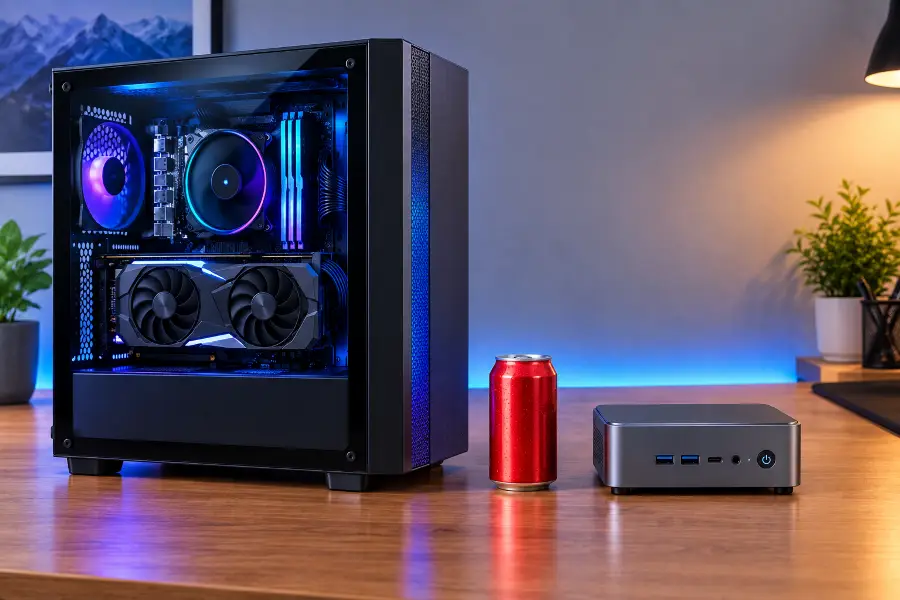
A mini PC is a complete desktop computer shrunk down to the size of a thick paperback. Like a tower, it comes without a screen, keyboard or mouse. You plug in your own and get to work.
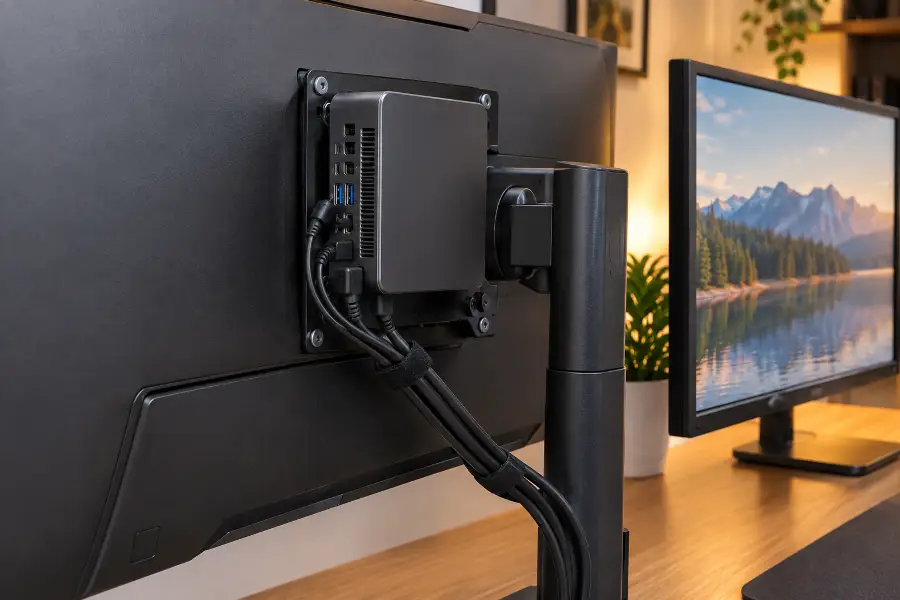
Most models measure around 12 to 15 cm on each side and 4 to 6 cm tall. That means you can park one under your monitor, tuck it into a drawer or screw it to the back of the screen with a VESA bracket (the standard four-hole mount on the back of most monitors).
Inside you'll find the same things as in any PC: a processor, memory (RAM), a fast NVMe SSD for storage, Wi-Fi, Bluetooth and a surprising number of ports. It runs full Windows 11, Linux or, in Apple's case, macOS. Nothing about it is "lite".
The trick is that most mini PCs use laptop-class processors. These chips are designed to give plenty of speed while using very little power, which is exactly why a mini PC can stay small, cool and quiet.
The big names on the Windows and Linux side are GEEKOM, Minisforum, Beelink and GMKtec, with ASUS covering the gaming end through its ROG NUC line. Apple's Mac mini is still the best-known mini PC of all, and it just got a refresh.
⚖️ Mini PC vs tower: side by side
Here's the quick version. Keep in mind that "tower" covers everything from a basic office box to a monster gaming rig, so the numbers below are typical ranges rather than hard rules.
| What matters | Mini PC | Desktop tower | Better choice |
|---|---|---|---|
| Size | Fits in your hand; can hide behind the monitor. | Needs real floor or desk space. | Mini PC |
| Everyday speed | Snappy for office work, browsing, calls and streaming. | Just as snappy, with lots of power to spare. | Tie |
| Long, heavy jobs video exports, 3D, big code builds | Works, but may slow down as it heats up. | Bigger coolers keep full speed for hours. | Tower |
| Gaming | Good for esports and 1080p; gaming models go further. | A full graphics card wins at 1440p and 4K. | Tower |
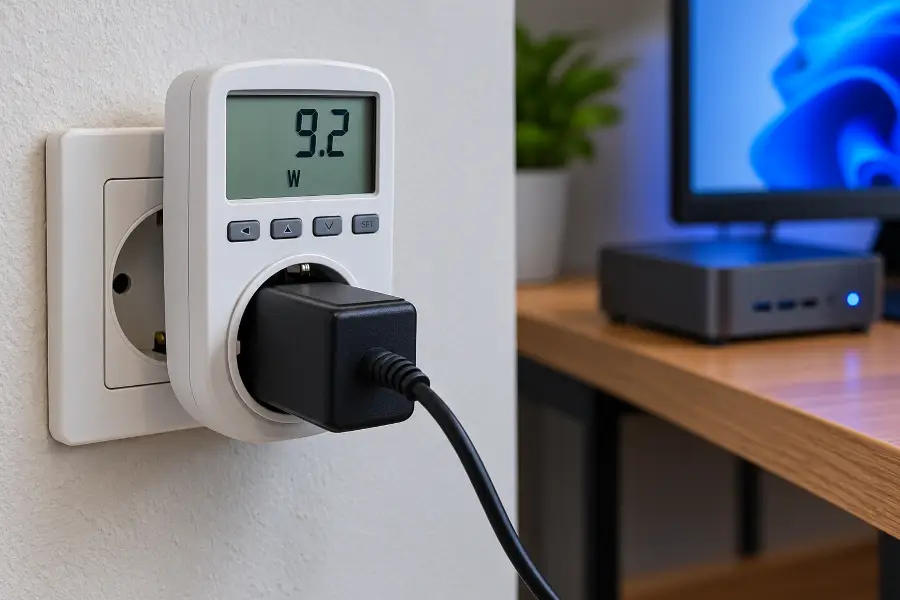
| Power use | About 6–15 W idle; 30–65 W under load (high-end models more). | About 50–100 W idle with a graphics card; 250–600 W gaming. | Mini PC |
| Noise | Near silent for normal work; a soft fan under load. | Can get loud when working hard. | Mini PC |
| Upgrades | Usually just the SSD, and RAM only if it isn't soldered. | Almost every part can be swapped. | Tower |
| Price for everyday use | RAM and SSD already included at pre-shortage contract prices. | Building one means paying today's high RAM and SSD prices. | Mini PC |
| Lifespan | Around 5–7 useful years. | 8–12 years with upgrades along the way. | Tower |
⚡ How fast does it feel day to day?
This is where most people are pleasantly surprised. For normal work, the kind that uses short bursts of power, a decent mini PC feels just like a tower. Apps open instantly, tabs switch without lag and video calls stay smooth while you share your screen.
If you sat most people in front of the two machines without telling them which was which, they wouldn't be able to pick the tower. The things that make a computer feel fast day to day are a quick NVMe SSD and enough RAM, and a good mini PC has both.
The difference shows up when you ask the computer to work flat out for a long time. Exporting a 40-minute 4K video, compiling a big software project, running a local AI model or crunching a large simulation keeps the processor at full power for many minutes.
A small box can only get rid of so much heat. Once it gets hot enough, the processor slows itself down to protect itself. This is called thermal throttling. It's normal and harmless, but it means that long job takes longer to finish.
A tower has room for big heatsinks, large fans and plenty of airflow, so it can keep running at full speed for hours. If long, heavy jobs are a big part of your week, that difference adds up.
🎮 Gaming on a mini PC
Gaming is where the tower still clearly wins, at least at the high end.
Most mini PCs use integrated graphics, meaning the graphics chip is built into the processor and shares the system memory instead of having its own. These chips have come a long way. AMD's Radeon 890M, found in many premium mini PCs, runs games like Valorant, League of Legends and Fortnite at high frame rates and handles plenty of newer games at 1080p with low to medium settings.
Chips like AMD's Ryzen AI Max+ 395 go even further. Its built-in Radeon 8060S graphics perform closer to a mid-range laptop graphics card, which is why machines like the GMKtec EVO-X2 have become popular with people who want one small box for work and play.
Still, a real desktop graphics card such as an NVIDIA GeForce RTX 5060 or AMD Radeon RX 9060 XT is in a different league. For big AAA games with ray tracing, high settings or a 144 Hz monitor at 1440p, a tower with a proper card is the way to go.
There is a middle ground: gaming mini PCs with a dedicated laptop graphics chip inside. The latest ASUS ROG NUC pairs an Intel Core Ultra processor with RTX 50-series laptop graphics, and the Minisforum AtomMan G7 PT combines a Ryzen 9 7945HX with a Radeon RX 7600M XT. Both run modern games very well at 1080p and 1440p.
The catch is price. These machines cost a lot more than a regular mini PC, and for the same money a tower usually gives you more gaming performance plus room to upgrade later.

💶 Prices in 2026 and the RAM shortage
This is the part that has changed the most since last year. AI data centres are buying up huge amounts of memory, and manufacturers have shifted production toward that more profitable market. The result is a shortage that has sent retail RAM and SSD prices soaring through 2026.
Here's why that matters for this decision. Mini PC makers usually buy memory and storage months in advance on long-term contracts. A lot of the RAM inside the mini PCs on sale right now was bought before prices exploded. When you build a tower yourself, you pay today's shop price for every stick of RAM and every SSD.
In mid-2026, a mini PC with an eight-core Ryzen 7, 32 GB of DDR5 and a 1 TB SSD was selling for roughly $550–600. Buying just the RAM and SSD separately for a self-built PC could cost more than that entire machine. For everyday computing, that's hard to argue with.
Apple has also shaken up its lineup. The new Mac mini, announced in late August, comes with either the new M6 chip or the M5 Pro and goes on sale on September 22. The US starting price is now $899, so the old sub-$600 entry Mac mini is no longer on the menu.
🏆 Mini PCs worth a look this year
The market now runs from cheap office boxes to machines that can game and run local AI models. These are the models that keep coming up in reviews and forums, grouped by what they're best at.
Best all-rounder for Windows
GEEKOM A9 Max
Built around the Ryzen AI 9 HX 370 with Radeon 890M graphics, it's fast for everyday work and light editing, has Wi-Fi 7 and two USB4 ports, and drives several 4K screens. A very balanced choice if you want Windows in a small box.
Best for macOS
Apple Mac mini (M6 / M5 Pro)
The new model arrives on September 22 with a choice of the M6 or M5 Pro chip. It stays almost silent, sips power and is excellent for photo, audio and video work. Memory can't be upgraded later, so pick enough on day one. If you find the previous M4 model at a good discount, it's still a great everyday Mac.
Best for power users and local AI
GMKtec EVO-X2
The Ryzen AI Max+ 395 inside brings strong integrated graphics and support for very large amounts of memory, up to 128 GB. That makes it a favourite for developers, virtual machines and running AI models at home. The memory is soldered, so choose your size carefully.
Best for gaming
ASUS ROG NUC
An Intel Core Ultra processor, RTX 50-series laptop graphics and a cooling system built for gaming. It handles high-refresh 1080p and 1440p gaming and is one of the few mini PCs that can honestly replace a mid-range gaming tower. It isn't cheap.
Best on a tight budget
GMKtec G10
An older Ryzen 5 3500U chip keeps the price low. It's quiet, uses little power and is perfectly fine for documents, browsing, streaming or as a small home server. Don't expect it to edit video or game, though.
Most repair-friendly
Framework Desktop
A small 4.5-litre PC built on a standard mini-ITX board with a Ryzen AI Max chip. You can swap storage, change the front ports and later move the board into another case. Like other Ryzen AI Max machines, its memory is soldered, so it's not upgradeable in that one area.

🤔 Who should buy which
The easiest way to decide is to ignore the heavy job you do twice a year and think about what your computer does most of the time.
✅ A mini PC suits you if you…
- Work from home with email, office apps, cloud tools and lots of video calls.
- Keep dozens of tabs open, stream 4K and jump between apps all day.
- Want a clean, quiet desk without a big box humming under it.
- Edit photos or make the occasional 1080p video.
- Play esports, indie or older games.
- Care about your electricity bill and a cooler room.
- Need a living-room media PC, a second computer or something you can carry between home and office.
- Want to replace an old, slow PC without paying today's high parts prices.
🖥️ A tower is still better if you…
- Play the newest AAA games at 1440p or 4K with high settings and ray tracing.
- Do 3D rendering, visual effects or animation for work.
- Edit long 4K or 8K video most days, where every minute of export time counts.
- Rely on CAD, engineering software or heavy simulations.
- Train AI models or need a powerful graphics card with lots of its own memory.
- Enjoy upgrading and want to swap the graphics card or processor down the line.
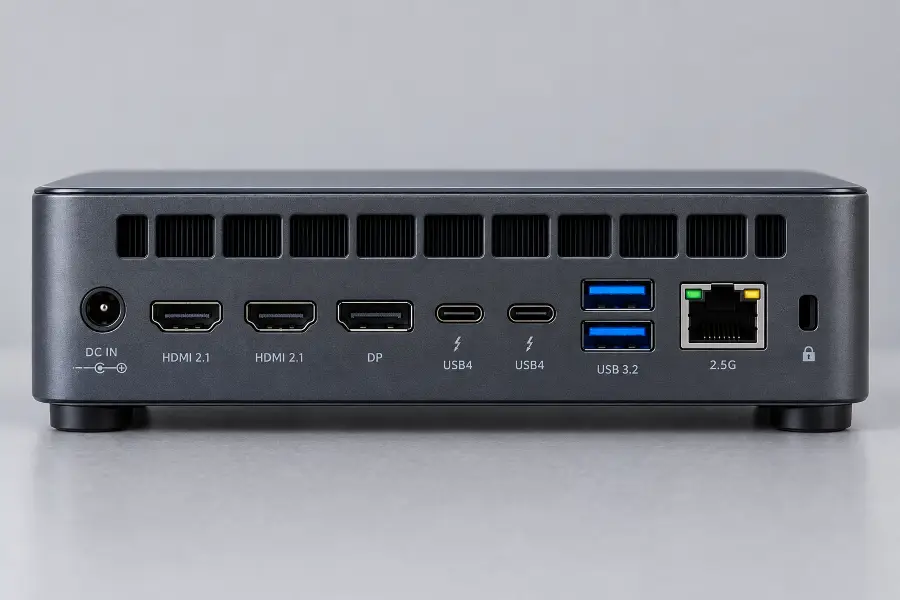
Before buying, count the video outputs on the back. They decide how many monitors you can connect.
🙋 My experience
I'll be honest: I didn't expect this to work. I've used full-size towers for well over a decade, and replacing mine with something the size of a hardback book felt like a step down. So I tested it properly and made the mini PC my only desktop for two months.
My normal day is writing, research with 30 to 40 tabs open, Lightroom edits, music in the background and a couple of video calls. The mini PC handled all of it without a single stutter. Honestly, it felt quicker than the old tower, mostly thanks to the faster SSD and double the RAM.
I measured power at the wall with a plug-in meter. The difference was bigger than I thought it would be:
Not everything went smoothly. In the first week, the 24-inch screen, connected with a USB-C to DisplayPort cable, often refused to wake up after sleep. A BIOS update and the latest AMD graphics driver fixed it, but I spent an evening figuring that out. I also had to set the fan profile to "quiet" in the BIOS, because the default setting ramped up the fan too eagerly.
The one place I really missed the tower was video. A 20-minute 4K export in DaVinci Resolve took noticeably longer, and the fan became clearly audible during the export. When I checked how I actually spent my week, though, exports were maybe 5% of my computer time.
What surprised me most was the room itself. No low hum from case fans, no warm air on my legs, and the whole computer disappeared behind the monitor. For the other 95% of my work, the mini PC was just as good and much nicer to live with. Unless I get back into heavy gaming or long video projects, I don't see a tower coming back to my desk.
❓ Frequently asked questions
Can a mini PC really replace a desktop tower in 2026?
Can a mini PC run multiple monitors?
How long does a mini PC last?
Are mini PCs cheaper than building a PC in 2026?
Can I keep my current monitor, keyboard and mouse?
Is a mini PC quiet enough for a bedroom or living room?
What do U, H and HX mean on mini PC processors?
🏁 The bottom line
In 2026, choosing a mini PC is no longer settling for less. For most people it's simply the smarter way to own a desktop: just as quick for daily work, far quieter, much cheaper to run and, thanks to the memory shortage, often better value than building your own.
Towers aren't going anywhere. If you live for high-end gaming, render 3D scenes, cut long 4K videos or love upgrading parts, a tower is still the right call.
Everyone else, whether that's remote workers, students, families or casual gamers, can make the switch with confidence. Once you've worked at a quiet, uncluttered desk, going back to a big humming box under it feels like a step backwards.
💬 Comments